
-
Recent Posts
Navigation
- Home
- Resources
- Post Processing
- Workflow
- Software
- Basic Edits
- Advanced Techniques
- HOW TO
- Select hair
- Create a Triptych
- Basic screen calibration
- Removing objects and healing blemishes
- HowTo – Starburst
- Twirl Effect
- Creating realistic shadows
- Monochrome
- Up-Scaling images
- Displacement Map Example
- Face in the clouds How-To (Stephen Hilton)
- The making of an intentionally blurred image (VIcki Moritz)
- Geoff’s Photo Doodler
- Printing and mounting images
- Kaleidoscope effect
- Adding a mist effect
- Artistic
- Post Processing Resources
- WCC Creative 2024
- Gallery
- Glossary
- Contact
Recent Comments
- Alan Mackinlay on Portraiture with DIY lighting
- Jennifer Anne Hartman on Printing and mounting images
- Ross Eddington on Nik Collection
- Ross Eddington on Topaz Labs AI Software – Sharpen, Denoise, Gigapixel, PhotoAI
- Geoff Shaw on Geoff’s Photo Doodler
Archives
- July 2026
- April 2026
- March 2026
- February 2026
- April 2025
- March 2025
- January 2025
- September 2024
- August 2024
- April 2024
- February 2024
- January 2024
- August 2023
- July 2023
- June 2023
- April 2023
- March 2023
- February 2023
- January 2023
- November 2022
- August 2022
- April 2022
- January 2022
- November 2021
- October 2021
- August 2021
- July 2021
- March 2021
- February 2021
- December 2020
- November 2020
- October 2020
- September 2020
- August 2020
Categories
Tag Archives: How To
Geoff’s photo doodler – Advanced Menu
As I add functionality to the program I have started a second menu to provide more space to place the controls. When you have loaded the image to draw, you can activate the Advanced menu by pressing the A key. … Continue reading
Posted in Advanced Edits, Post-Processing, Software
Tagged doodle, How To, HowTo, software, techniques
Leave a comment
Twirl Effect
Twirl, found under Filters>>Distort in the Photoshop menu can be used to make some interesting effects. Consider the simple crossed lines image below. Activate the Twirl dialog, and adjust the Angle slider to achieve your desired degree of twirl. I’ll … Continue reading
The making of “At Home with the Mouse Family” by Bob Thomas
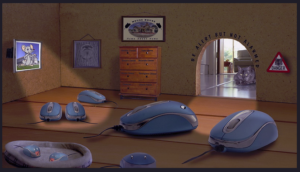
Bob has kindly shared a short video to show how he made his award winning entry “At Home with the Mouse Family” Continue reading
Posted in Advanced Edits, Artistic, How-to, Post-Processing, Resources
Tagged How To
Leave a comment
Doug Porter – Hons SIG 10 June and Creative SIG – 11 Aug 2020
Here is a chance to see some of Doug Porter’s expertise as he transforms mediocre images in Photoshop to amazing works of fine art. Continue reading
Backup
The importance of backup Tidying my room a while agoI came across a very dusty doc I had made yonks ago on the importance of computer backup. It had the “Backup song” that parodies the song “Yesterday” by the Beatles. … Continue reading
Posted in Backup, File management, Software, Workflow
Tagged How To, techniques, Workflow
Leave a comment